
If you’re searching for a US Legal Forms review, you’re probably wondering whether this service is actually worth paying for—or if you’re better off handling your legal documents another way. US Legal Forms provides access to thousands of legal forms and documents covering areas such as business formation, contracts, real estate, estate planning, and more. But having a huge library of forms doesn’t automatically mean the service is right for you.
The bigger question is whether US Legal Forms can save you time and money while giving you the documents you actually need. In this review, we’ll look at what US Legal Forms offers, how it works, its pricing, key features, pros and cons, and the types of users who are most likely to benefit from it.
We’ll also cover its limitations and explain what you should know before signing up. By the end of this US Legal Forms review, you’ll have a clearer picture of whether it’s a practical option for your situation—and whether it’s worth putting your money into.
Disclosure: This post contains an affiliate link. If you sign up through it, we may earn a commission at no extra cost to you. That said, everything below reflects our honest assessment of the platform.
What Is US Legal Forms?
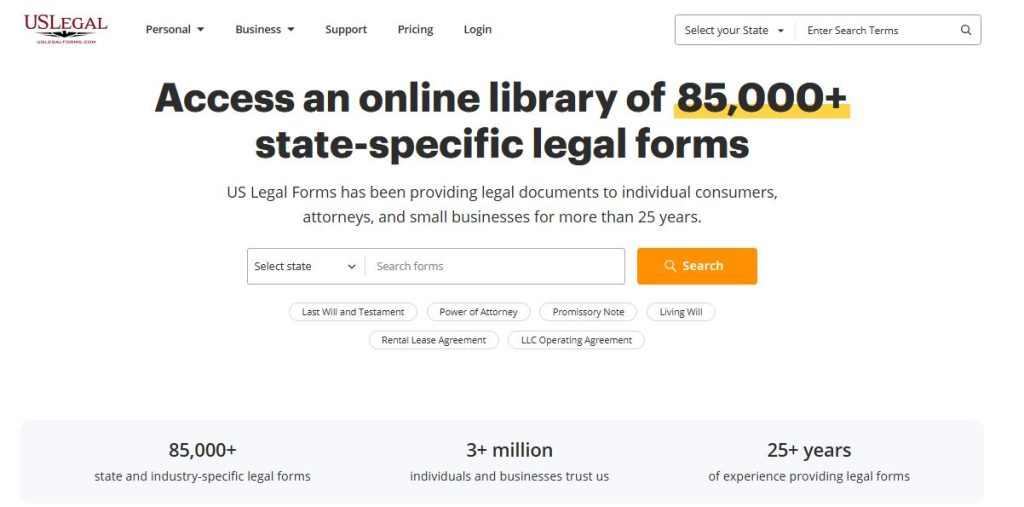
US Legal Forms is an online library of legal document templates covering business, personal, real estate, estate planning, and family law needs. Instead of drafting a contract from scratch or paying an attorney’s hourly rate for a standard document. You can search or browse their library, select a template relevant to your situation, customize it with your specific details, and download a finished document. Typically compliant with your state’s requirements.
At a high level, here’s how it works:
You create an account, either search for the specific document you need (like “NDA” or “LLC operating agreement”). Alternatively, you can also browse by category, fill in a guided form with your details (party names, dates, state, specific terms). And download the completed document as a Word file or PDF, ready to sign.
It’s built primarily for two audiences. Individuals handling personal legal needs (wills, powers of attorney, lease agreements) and small business owners and freelancers who need routine legal documents. That is contracts, formation paperwork, NDAs — without the cost of hiring an attorney for every single one.
Key Features Breakdown
Document library size and categories. US Legal Forms gives you access to a large catalog. Over 85,000 legal forms that you can edit, fill out, notarize online, download, print, or store in your account. The library spans business formation documents, contracts, real estate forms, estate planning (wills, powers of attorney), and family law templates. All in one place rather than scattered across multiple sites.
State-specific customization. Forms are organized and tailored by state so they match local requirements, covering everything from leases and deeds to contracts, family-law forms, and small-business documents. This matters — as covered in our LLC formation guide, a generic template that ignores state-specific rules can cause real problems down the line.
Ease of use / interface. User feedback is mixed but generally positive here. Some reviewers note the platform saves hours of time compared to drafting forms from scratch and describe it as easy to use and cost-effective, while others point out a rougher edge: titles for documents aren’t always intuitive, and some forms don’t allow editing of every field.
Subscription vs. one-off purchase options. US Legal Forms is primarily a subscription model that unlocks unlimited downloads and edits from the library, with some forms available as single purchases. You can deactivate your subscription anytime, and since the switch to a subscription model, a single month of access typically costs less than a one-off form purchase used to — worth knowing if you only need one document right now.
Attorney-drafted quality control. A team of lawyers and paralegals has been building the library for over 20 years, which is a meaningful trust signal compared to free templates floating around random websites with no legal review behind them.
Customer support and extras. The Premium tier goes beyond plain templates. It includes a pdfFiller subscription for editing, annotating, and creating fillable PDFs. A signNow subscription for e-signature workflows, and completion services where legal form experts help you select and complete packages for last wills, living wills, and powers of attorney. Security-wise, data is stored in US-based Amazon S3 data centers with 256-bit encryption.
US Legal Forms Pricing
US Legal Forms runs on two subscription tiers, and the difference between paying monthly vs. annually is significant:
Basic Plan: $96 per year (which works out to $8/month), or $39/month if you pay monthly. This gives you full access to the forms library — the core value if all you need is state-specific templates.
Premium Plan: $180 per year (equivalent to $15/month), or $59/month if you pay monthly. Premium adds the pdfFiller subscription (editing, annotating, creating fillable PDFs). And signNow (e-signature workflows), plus completion services for last wills, living wills, and powers of attorney.
The pattern here is clear. Annual billing is dramatically cheaper than monthly — roughly 80% off on Basic and 75% off on Premium. If you know you’ll use the service beyond a single document, paying annually is the obvious move.
If you only need one document right now. Since switching to a subscription model, a single month of access costs less than a single form used to cost under the old pay-per-form pricing. That means the cheapest legitimate route to one document is a monthly Basic or Premium plan. Used for the month you need it, then canceled. You can deactivate your subscription anytime in your account settings, and you keep full access for the remainder of the billing period you already paid for.
Comparing to a lawyer: a single attorney-drafted contract or agreement can easily run $200–$500 or more, depending on complexity. Even at the higher monthly Premium price ($59). You’re getting access to the entire 85,000+ form library for less than the cost of one standalone attorney-drafted document. And that gap widens considerably if you go with annual billing.
Refund policy: US Legal Forms offers a 30-day money-back guarantee. If you’re not satisfied, this lowers the risk of trying it out.
One extra worth flagging for small business owners specifically. Premium subscribers also get a discount on business/legal entity formation services. Useful if you’re planning to actually form an LLC rather than just draft the supporting documents.
Pros
- Significantly cheaper than hiring a lawyer. Even at the top Premium tier, a full year of unlimited access costs less than a single attorney-drafted contract. And that gap only widens the more documents you actually need.
- Massive document library. With over 85,000 forms spanning business, personal, real estate, and family law categories. It’s genuinely a one-stop shop rather than something you’ll outgrow after your first document.
- State-specific compliance built in. Forms are organized and tailored by state, which matters far more than it sounds. A generic template that ignores state-specific requirements can create real legal gaps.
- Attorney-drafted, not crowdsourced. The library has been built by a team of lawyers and paralegals over 20 years, giving it a credibility edge over free templates of unknown origin.
- Good for recurring small business needs. If you’re the type of business owner who’ll need multiple documents over time. Contracts, NDAs, LLC paperwork, lease agreements — a subscription model means each additional document costs you nothing extra.
- Low-risk to try. Between the ability to cancel anytime, the fact that a single month of access is cheaper than the old per-form pricing, and a 30-day money-back guarantee. There’s minimal downside to testing it out.
- Bundled tools on Premium. The Premium tier’s inclusion of pdfFiller and signNow means you’re not paying for separate editing and e-signature tools on top of your legal templates.
Cons
- Not a substitute for a lawyer in complex or high-stakes situations. Templates work well for standard, well-understood agreements. But a complicated multi-party business deal, an unusual ownership structure, or anything already headed toward a dispute genuinely needs an attorney’s judgment.
- Some forms aren’t fully editable. A recurring complaint among users is that certain fields are locked or can’t be edited the way they’d expect. Which can be frustrating if your situation doesn’t fit neatly into the template’s assumptions.
- Not every form is state-specific. Some users have noted that not all forms carry the same level of localization. Worth double-checking the specific document you need before assuming it’s automatically tailored to your state.
- Interface feels dated in places. Feedback on the platform’s design is mixed. Some reviewers describe it as easy to use, while others call out an older interface and inconsistent document titling.
- Premium’s extras may not be worth it for everyone. If you don’t need e-signature workflows (signNow) or PDF editing tools (pdfFiller), the jump from Basic to Premium pricing may not pay for itself.
- Monthly pricing is a poor value if you forget to cancel. The monthly rate is priced deliberately higher to push you toward annual billing. If you sign up for a single document and forget to cancel, you’ll pay considerably more than the annual-equivalent rate.
Who US Legal Forms Is Actually a Good Fit For
Freelancers and solopreneurs who need standard, recurring documents. NDAs before sharing project details, service agreements for new clients, or independent contractor agreements. If you’re taking on new clients regularly, the subscription pays for itself fast since each additional document costs nothing extra.
Small business owners forming an LLC or handling routine paperwork. Between the state-specific Operating Agreement templates and the discounted business/legal entity formation services on Premium. It’s a solid fit for the exact process covered in our LLC formation guide.
Landlords managing lease agreements. With state-specific lease and rental templates included in the library. It covers a need that comes up repeatedly for anyone managing even a single rental property.
Anyone who needs something more reliable than a free template found online, but doesn’t need custom legal counsel. If your situation is standard, attorney-drafted templates hit the sweet spot between free (and often outdated or non-compliant) templates and paying full attorney rates.
People who’ll need multiple documents over time, not just one. Because of the subscription pricing structure, the value compounds the more you use it.
Who Should Consider a Lawyer Instead
Anyone involved in a complex, multi-party business deal. Mergers, acquisitions, or agreements involving several stakeholders with competing interests need custom-negotiated terms that a standardized template isn’t built to handle.
Anyone already in a dispute or facing potential litigation. If a disagreement over a contract has already escalated. You will need legal advice specific to your situation, not a new template.
Businesses with unusual ownership structures or high-value assets. A multi-member LLC with complex profit-sharing arrangements, significant real estate holdings, or plans to bring on investors benefits from an attorney who can tailor the agreement to your specific structure.
Anyone unsure whether their situation is actually “standard.” If you’re not confident your needs fit neatly into a template. It’s worth a consultation before assuming a form will cover you.
A useful gut check. If you could explain your situation in a sentence or two and it sounds like something thousands of other small businesses deal with regularly (an NDA, a standard lease, a basic LLC), a template is probably fine. If your explanation needs several paragraphs of caveats, that’s usually a sign you need a lawyer’s judgment instead.
US Legal Forms vs. Alternatives (Brief Comparison)
Two names come up most often alongside US Legal Forms: LegalZoom and Rocket Lawyer. Here’s the short version of how they differ:
LegalZoom
LegalZoom operates unlimited access to its form library runs $99 per year on its own. Though most people encounter LegalZoom through its business formation services (LLC formation starting around $0 plus state fees) rather than the form library itself. It’s a stronger fit if you specifically want business formation handled for you, with legal templates as more of a side feature.
Rocket Lawyer
It takes a membership approach rather than a pure document library. Annual membership tiers run $149, $249, and $349 with unlimited documents, e-signatures, and AI drafting tools included at every tier. Plus access to discounted attorney consultations. It’s a reasonable option if you want ongoing attorney access bundled in. But it’s a notably higher price point than US Legal Forms’ Basic or Premium tiers if all you need is the form library itself.
Where US Legal Forms stands out
At $96–$180 per year, it’s meaningfully cheaper than either alternative. If your core need is the document library itself rather than bundled attorney consultations or a managed formation service. If you specifically want someone else to file your LLC paperwork for you, LegalZoom or a dedicated formation service may be a better fit. But if you’re comfortable filing yourself and just need reliable, state-specific documents, US Legal Forms is the more cost-effective option of the three.
Real-World Use Case Example
Say you’re a freelance graphic designer who just landed a new client. A mid-sized company that wants you to redesign their brand identity. Before you send over any concepts, you need an NDA to protect both the unreleased branding work and the client’s internal feedback discussions. Here’s how that plays out on US Legal Forms. You search the library for “NDA” and find both unilateral and mutual template options. Since you’re the one being shown confidential brand strategy (not the other way around), you select the mutual NDA template. The client will likely share sensitive information too. You fill in the guided fields. Your business name, the client’s company name, the effective date, and a description of what counts as confidential. You set the jurisdiction to your state, review the completed document, and download it as a PDF. The whole process takes around ten minutes.
A few weeks later, the same client asks you to bring on a subcontractor to help with the illustration work. Now you need a different document: an independent contractor agreement between you and the subcontractor. Since you’re already subscribed, this second document costs nothing extra. You search the library again, select the relevant template, and repeat the same customization process.
This is exactly where the subscription model pays off in practice. The first document alone might not have justified the cost over a free template, but by the second or third document within the same month, the math clearly favors the subscription — especially compared to paying a lawyer’s rate for each one individually.
Final Verdict: Is It Worth It?
Yes — for the right use case. If you’re a freelancer, small business owner, or landlord who regularly needs standard legal documents (NDAs, contracts, lease agreements, LLC paperwork), US Legal Forms is genuinely worth it. The math is straightforward: even the Premium plan’s annual cost is less than a single attorney-drafted document, and every additional form you need after that costs nothing extra.
To recap the core value proposition: an 85,000+ form library, built by lawyers and paralegals over 20 years, with state-specific customization that generic free templates don’t offer — all for $8 to $15 per month on annual billing. Add in a 30-day money-back guarantee and the ability to cancel anytime, and there’s very little financial risk in trying it for your next document.
Where it’s not worth it: if you only need one document, ever, and you’re not confident you’ll use the platform again — a single lawyer consultation for a one-off, unusual situation may serve you better. And if your situation involves real complexity — a multi-party deal, an active dispute, an unusual business structure — no template service is a substitute for an actual attorney’s judgment.
For the vast majority of freelancers and small business owners handling standard paperwork, though, the combination of cost, breadth, and state-specific compliance makes US Legal Forms a smart default over drafting from scratch or gambling on a free template of unknown origin.
FAQ
Is US Legal Forms legally binding?
Yes — the documents themselves are legally binding once properly completed, signed, and (where required) notarized, the same as any properly executed legal document. The platform provides the template and structure; you’re still responsible for filling it in accurately and following any state-specific signing or notarization requirements.
Can I cancel my subscription anytime?
Yes. You can deactivate your subscription anytime from your account settings, and you’ll keep full access to the library for the remainder of the period you’ve already paid for — you won’t be billed again after canceling.
Does US Legal Forms review my documents?
Not by default on every plan. The Basic and Premium tiers give you access to attorney-drafted templates, but they aren’t reviewing your specific completed document. Premium does include completion services specifically for last wills, living wills, and powers of attorney, where legal form experts help you select and complete those particular packages — but that’s narrower than a full document review service.
Is US Legal Forms good for LLC formation specifically?
It’s a strong fit for the document side of LLC formation — state-specific Operating Agreements, registered agent forms, and banking resolutions — and Premium subscribers get a discount on business/legal entity formation services if they want the actual state filing handled for them too. If you want a dedicated formation service to file everything on your behalf from the start, a formation-focused service like LegalZoom may be a more direct fit.
How does US Legal Forms compare to free templates online?
The main difference is quality control and specificity. Free templates found through a general search are often outdated, not tailored to your state, or written without legal review. US Legal Forms’ library has been built and maintained by lawyers and paralegals over two decades, with state-specific versions — a meaningful step up in reliability for a relatively small monthly cost.