
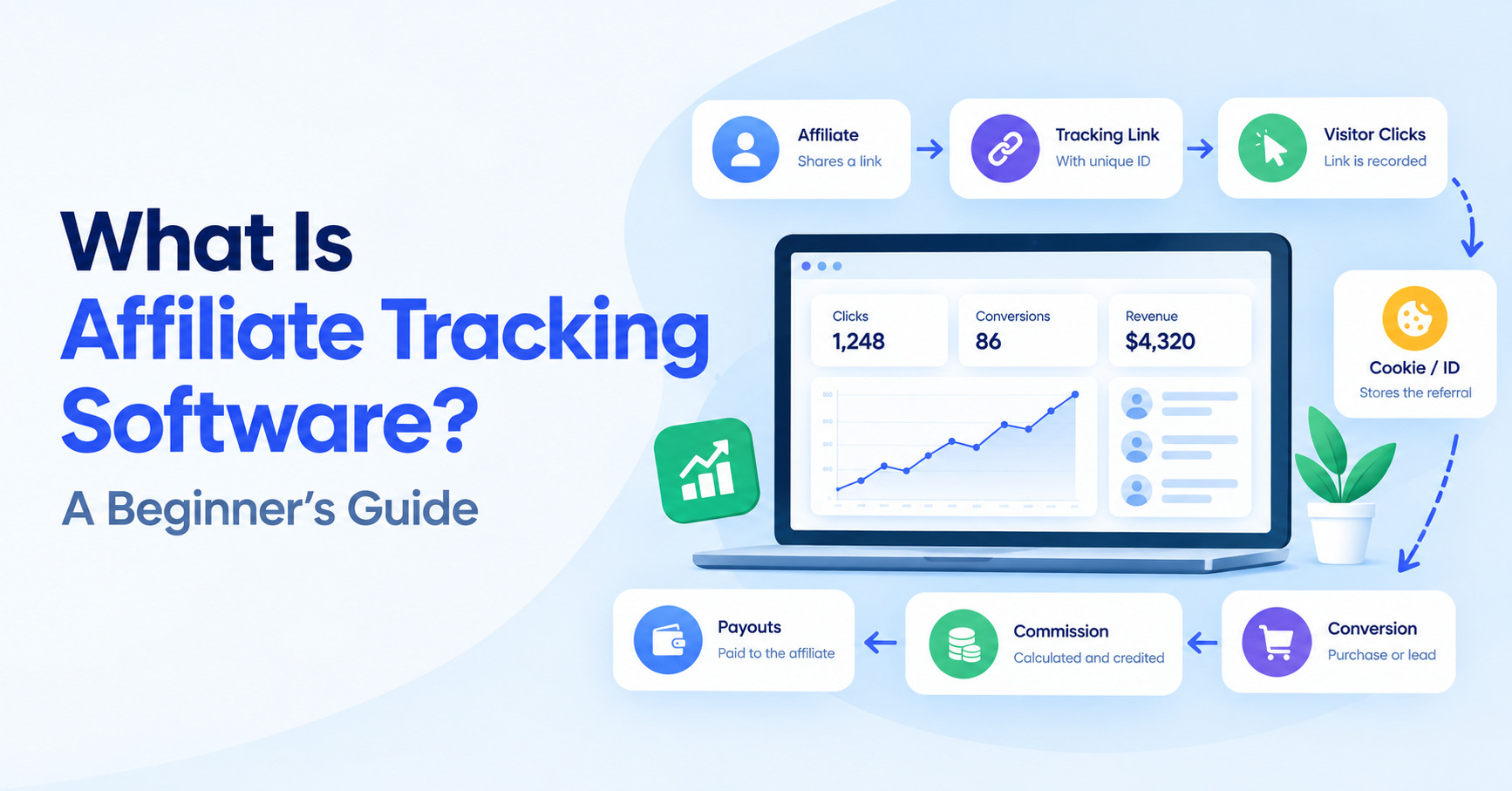
Learn how affiliate tracking software works, including affiliate links, cookies, tracking IDs, conversion tracking, commissions, reporting and tracking platforms.
Affiliate marketing depends on one fundamental question:
Who should receive credit when a customer makes a purchase?
If a customer clicks an affiliate’s link, visits a website, and eventually makes a purchase, the business needs a reliable way to connect that conversion back to the affiliate who referred the customer.
That’s where affiliate tracking software comes in.
Affiliate tracking software helps businesses record affiliate clicks, identify referral sources, attribute conversions, calculate commissions, and analyze affiliate performance. Depending on the platform, it can also support affiliate links, tracking IDs, cookies, postbacks, reporting, payouts, and integrations with ecommerce or payment systems.
In this guide, we’ll explain how affiliate tracking works, why it matters, how clicks and conversions are connected, and what to look for when choosing an affiliate tracking platform.
We’ll also look at several examples of affiliate tracking tools, including Trackdesk, Voluum, ClickMagick, HYROS, and RedTrack.
What Is Affiliate Tracking?
Affiliate tracking is the process of recording and attributing activity generated by an affiliate.
At its simplest, the process looks like this:
Affiliate → Tracking Link → Visitor → Website → Conversion → Commission
An affiliate receives a unique tracking link from a business or affiliate platform. When someone clicks that link, the tracking system records information about the visit.
If the visitor subsequently completes a defined conversion, such as purchasing a product, subscribing to a service, or submitting a lead form, the tracking system attempts to connect that conversion with the original affiliate referral.
The result is an attribution record that can be used to calculate the affiliate’s commission.
Modern affiliate tracking platforms can use several technologies to accomplish this, including cookies, unique click IDs, URL parameters, pixels, JavaScript, APIs, and server-to-server postbacks.
The exact setup depends on the business model and the software being used.
Why Is Affiliate Tracking Necessary?
Without a reliable tracking software, running an affiliate program becomes difficult very quickly.
Imagine that 100 affiliates are promoting your product.
During a particular month, your business receives 5,000 visitors from affiliate links and generates 300 sales.
You need to know:
- Which affiliate generated each sale?
- Which affiliate generated the most revenue?
- How many clicks did each affiliate produce?
- Which links generated conversions?
- How much commission does each affiliate earn?
- Which traffic sources are performing?
- Are there duplicate or suspicious conversions?
- Which affiliates should receive higher commission rates?
Trying to answer all of these questions manually can be complicated.
An affiliate tracking platform automates much of this process by collecting information about clicks and conversions and connecting those events.
Good tracking is also important for affiliate relationships.
If affiliates believe their referrals aren’t being properly attributed, they may lose confidence in the program.
Accurate tracking therefore affects both the business and its partners.
How an Affiliate Click Is Recorded
The first step in most affiliate tracking systems is recording the click.
An affiliate is usually given a unique tracking link.
For example:
http://hyros.com/affiliate-grow.html?fpr=peter-87
The actual URL structure will vary depending on the affiliate software.
When a visitor clicks the link, the tracking system can record information such as:
- Affiliate ID
- Click ID
- Offer or campaign
- Landing page
- Traffic source
- Campaign parameters
- Device information
- Location information
- Referrer information
- Timestamp
Some systems send the visitor directly to the destination page with tracking parameters attached.
Others first send the visitor through a tracking or redirect URL before forwarding them to the destination.
For example:
Affiliate link → Tracking system → Merchant website
The tracking system can generate a unique identifier for the click before sending the visitor onward.
Trackdesk, for example, generates affiliate tracking links and supports additional parameters that can be used to provide information about traffic sources, campaigns, placements, and other contextual data.
This additional information can make reporting more useful because you’re not simply seeing that an affiliate generated a click; you can potentially see where that click came from.
How Are Conversions Attributed?
Recording the click is only half of the process.
The tracking system also needs to recognize when a conversion occurs.
A conversion could be:
- A product purchase
- A subscription
- A lead submission
- A free-trial signup
- An app installation
- A booking
- A qualified customer
- Another predefined action
The tracking system then attempts to connect the conversion to the appropriate affiliate click.
A simplified example looks like this:
Step 1: Jane clicks Affiliate A’s tracking link.
Step 2: The system records a unique click ID.
Step 3: Jane visits the merchant’s website.
Step 4: Jane purchases a $100 product.
Step 5: The merchant’s tracking system records the purchase.
Step 6: The conversion is matched with the original click.
Step 7: Affiliate A receives credit for the conversion.
Step 8: The affiliate’s commission is calculated.
This process is called affiliate conversion tracking.
The exact attribution rules can vary.
For example, a business may define a particular attribution window, prioritize certain tracking methods, or use different rules for coupon codes and affiliate links.
That’s why understanding the tracking configuration is important when evaluating affiliate tracking software.
Cookies
Cookies are one of the technologies historically used for affiliate tracking.
When someone clicks an affiliate link, a tracking system may place a cookie in the visitor’s browser containing information that helps identify the referral.
If the visitor returns later and converts within the applicable tracking period, the cookie can help connect the conversion to the affiliate.
For example:
Affiliate click → Cookie stored → Visitor returns later → Purchase → Affiliate receives credit
However, cookies aren’t the only technology used for affiliate tracking.
Modern browsers, privacy settings, cookie restrictions, ad blockers, and changes in tracking policies can affect how browser-based tracking works.
For this reason, many affiliate tracking platforms also support other approaches.
These can include:
- First-party tracking
- URL parameters
- Click IDs
- Pixels
- JavaScript
- APIs
- Server-to-server tracking
- Postbacks
- Coupon attribution
A good affiliate tracking setup should therefore be evaluated based on the complete tracking architecture rather than simply whether it uses cookies.
Tracking IDs
A tracking ID is a unique identifier associated with a click, affiliate, campaign, or other tracking event.
One particularly important identifier is the click ID.
Consider this simplified example:
Affiliate link clicked → Click ID generated → Click ID passed through the funnel → Conversion occurs → Click ID returned → Conversion attributed
The click ID acts like a reference number connecting different stages of the customer’s journey.
RedTrack, for example, describes its click ID as a unique identifier generated when a user clicks a tracking link and used to match the conversion back to the original click.
Trackdesk also uses unique click IDs in certain tracking flows, including integrations with third-party affiliate networks and platforms.
Tracking IDs can be especially useful when the conversion doesn’t happen immediately after the initial click.
They can help the tracking system maintain the connection between the original referral and the eventual conversion.
Affiliate Conversion Tracking
Affiliate conversion tracking is the process of recording a desired action and attributing it to the appropriate affiliate.
There are several ways this can happen.
Pixel or JavaScript tracking
A tracking script can be placed on a confirmation or conversion page.
When the customer completes the desired action, the script sends information to the affiliate tracking system.
This approach can work well when the business controls the website and can add tracking code.
Server-to-server tracking
With server-to-server, or S2S, tracking, the conversion information is sent directly between systems.
For example:
Customer purchase → Merchant system → Affiliate tracking platform
The tracking platform receives information about the conversion and associates it with the relevant click ID or other identifier.
S2S tracking can be particularly useful when a business wants conversion tracking that doesn’t depend entirely on browser-side scripts.
API tracking
An API can also be used to send conversion information between systems.
This can be useful for SaaS companies, custom applications, marketplaces, and businesses with more complex technical environments.
Coupon tracking
Some affiliate systems can attribute a sale based on an affiliate-specific coupon code.
This can be useful when an affiliate promotes a product through channels where traditional affiliate links aren’t always practical.
The best tracking method depends on how your business processes conversions.
Commission Tracking
Tracking conversions isn’t enough.
Affiliate software also needs to determine how much the affiliate should earn.
Suppose an affiliate generates a $500 sale and receives a 20% commission.
The tracking system could calculate:
$500 × 20% = $100 commission
But commission structures aren’t always that simple.
Businesses may use:
- Percentage commissions
- Fixed commissions
- Recurring commissions
- CPA commissions
- Tiered commissions
- Product-specific commissions
- Affiliate-specific rates
- Hybrid commission structures
Affiliate tracking software can connect the conversion record with the appropriate commission rule.
For example:
Click → Conversion → Revenue → Commission rule → Affiliate balance
This is one reason businesses often use dedicated affiliate software rather than simply creating tracking links manually.
The platform can connect tracking, conversion data, commission calculations, reporting, and affiliate management.
Reporting
Reporting is another major component of affiliate tracking.
Once your tracking system is collecting data, you should be able to analyze the performance of your affiliate program.
Depending on the platform, reports may include:
- Clicks
- Conversions
- Conversion rate
- Revenue
- Commission
- Affiliate performance
- Campaign performance
- Traffic sources
- Landing pages
- Offers
- Geographic information
- Device information
For example, suppose Affiliate A generated 1,000 clicks and 50 sales while Affiliate B generated 500 clicks and 40 sales.
Simply looking at clicks would suggest Affiliate A generated more traffic.
But the conversion data tells a different part of the story.
Affiliate A:
1,000 clicks → 50 conversions = 5% conversion rate
Affiliate B:
500 clicks → 40 conversions = 8% conversion rate
That kind of information can help businesses understand affiliate performance beyond raw traffic volume.
Advanced affiliate tracking tools can also connect tracking information with campaign and traffic-source data.
Affiliate Tracking Software vs. Spreadsheets
Some businesses initially manage affiliate programs using spreadsheets.
A spreadsheet might contain columns such as:
| Affiliate | Clicks | Sales | Revenue | Commission |
|---|---|---|---|---|
| Affiliate A | 500 | 25 | $2,500 | $500 |
| Affiliate B | 300 | 18 | $1,800 | $360 |
| Affiliate C | 750 | 32 | $3,200 | $640 |
This can work for a very small affiliate program.
However, spreadsheets have limitations.
They don’t naturally record every click in real time, generate unique tracking IDs, attribute browser activity, receive conversion events, manage tracking links, or automate complex commission calculations.
As the number of affiliates and conversions increases, manually maintaining the data can also introduce errors.
Dedicated affiliate tracking software can automate much of this infrastructure.
Instead of manually recording:
Affiliate → Click → Sale → Commission
the tracking platform can capture the events automatically.
That doesn’t mean spreadsheets have no use.
Businesses may still use spreadsheets for analysis, financial reconciliation, custom reporting, or data exports.
But spreadsheets generally work better as a supporting tool than as the core tracking infrastructure for a growing affiliate program.
Examples of Affiliate Tracking and Attribution Software
Not every tool described as an “affiliate tracking” platform does the same job.
Some platforms are designed primarily for businesses running affiliate programs or affiliate networks, where the goal is to recruit affiliates, provide tracking links, record conversions, calculate commissions, and manage partner relationships.
Other platforms are primarily ad tracking and attribution tools used by media buyers and affiliate marketers who purchase traffic from sources such as Meta, Google, TikTok, native advertising networks, and other paid channels.
These tools can help connect the customer’s journey from ad click → landing page → offer → conversion, allowing marketers to understand which traffic sources, campaigns, ads, and touchpoints are generating results.
Here are five examples and what each platform is primarily designed to do.
1. Trackdesk
Trackdesk is primarily an affiliate tracking and management platform for businesses running affiliate programs, referral programs, partnerships, and affiliate networks.
Rather than focusing mainly on buying advertising traffic, Trackdesk is designed to help a business operate the affiliate side of its marketing program.
Key features include:
- Affiliate tracking — Tracks affiliate clicks, conversions, revenue, and related performance data.
- Affiliate program management — Helps businesses invite, register, approve, manage, and communicate with affiliates.
- Commission management — Supports commission structures and payout preparation based on affiliate performance.
- Conversion attribution — Connects conversions with the appropriate affiliate and tracking activity.
- Third-party network integrations — Can connect external affiliate networks and platforms using click IDs and server-to-server postbacks.
- Reporting and analytics — Provides real-time reporting for clicks, conversions, revenue, commissions, and other affiliate metrics.
Trackdesk can also be used when a business wants to bring offers from external affiliate networks or platforms into one affiliate-management environment. Its current documentation describes using click IDs and postbacks to connect third-party platforms and return conversion data to Trackdesk.
Best for: Affiliate program, affiliate network, and partner tracking and management software.
2. Voluum
Voluum is primarily an ad tracking and attribution platform for media buyers, affiliates, and performance marketers.
Its focus is on understanding where paid traffic comes from, what happens after someone clicks an advertisement, and which campaigns or traffic sources ultimately generate conversions.
Key features include:
- Multi-channel ad tracking — Track traffic and campaign activity across different advertising channels.
- Conversion tracking — Records conversions and important conversion information such as payout and transaction data.
- S2S postback tracking — Uses server-to-server communication to receive conversion information from affiliate networks and other platforms.
- Attribution — Helps connect conversions back to the traffic and touchpoints that generated them.
- Campaign analytics — Provides centralized performance data so media buyers can compare campaigns and traffic sources.
- LTV and conversion analysis — Supports tracking different conversion types and subsequent customer value.
Voluum’s documentation describes tracking events such as impressions, visits, clicks, and conversions, while its current feature set includes redirect and direct tracking, APIs, S2S postbacks, and attribution functionality.
Best for: Paid-traffic tracking and attribution software for media buyers and affiliate marketers.
3. ClickMagick
ClickMagick is an ad tracking, conversion attribution, and marketing optimization platform that can also be used for affiliate marketing.
It is particularly focused on helping marketers understand what happens between the initial click and the eventual conversion.
Key features include:
- Click and conversion tracking — Tracks clicks, conversions, and customer journeys across marketing campaigns.
- Multi-touch attribution — Provides attribution models beyond simple last-click measurement, including models such as linear, position-based, and time-decay.
- Cross-device tracking — Helps connect activity when visitors interact with campaigns across multiple devices.
- Smart Links — Provides configurable tracking links with options such as geotargeting and custom domains.
- Bot and click-fraud protection — Tools designed to identify and filter unwanted or suspicious traffic.
- Affiliate marketing tools — Supports affiliate promotions and integrates with more than 100 affiliate networks using server-to-server postback tracking.
ClickMagick also provides tools for tracking offline conversions, analyzing funnels, sharing reports, and sending conversion data back to advertising platforms.
Best for: Ad tracking and attribution software with additional tools for affiliate marketers and performance marketing.
4. RedTrack
RedTrack is a conversion tracking, attribution, and marketing analytics platform built around paid media, performance marketing, and affiliate traffic.
Its goal is to give marketers a more complete view of how traffic moves through campaigns and funnels and which interactions lead to conversions.
Key features include:
- Conversion tracking — Tracks conversions across different channels and campaign types.
- Server-side tracking — Captures events on the server rather than relying entirely on browser-based tracking.
- Attribution modeling — Provides different ways to assign credit to marketing touchpoints.
- Funnel tracking — Allows marketers to analyze how visitors move through different stages of a funnel.
- Conversion and revenue reporting — Helps connect traffic sources with conversions, revenue, and other performance metrics.
- Ad-platform data sharing — Can send conversion information back to platforms such as Google, Meta, and TikTok through APIs and server-to-server connections.
RedTrack also provides publisher/affiliate tracking, post-conversion updates, deduplication, conversion-path reporting, click logs, and integrations with advertising and affiliate platforms.
Best understood as: Paid-media tracking and attribution software for advertisers, agencies, and performance marketers.
5. HYROS
HYROS is primarily an ad tracking and attribution platform focused on connecting advertising activity with the broader customer journey.
It is particularly positioned around businesses where a conversion may happen after several interactions rather than immediately after an ad click.
Key features include:
- Multi-channel attribution — Connects customer interactions across advertising and other marketing channels.
- Customer journey tracking — Helps marketers see the sequence of touchpoints leading to a conversion.
- Server-side tracking — Uses server-side data collection as part of its tracking approach.
- Attribution modeling — Supports different methods for assigning credit to touchpoints across a customer’s journey.
- LTV and revenue analysis — Helps connect advertising activity with customer value, including repeat purchases and subscription revenue.
- Ad-platform data integration — Sends conversion information back to advertising platforms such as Meta, Google, and TikTok.
HYROS currently describes its platform as tracking customer journeys across advertising channels and connecting delayed purchases, repeat purchases, subscriptions, and other conversion events back to advertising activity.
Best understood as: Customer-journey, ad tracking, and attribution software for businesses running performance advertising.
How These Tools Differ
Although all five platforms can be associated with tracking, their primary use cases are different.
| Platform | Primary use case | What it mainly tracks/manages |
|---|---|---|
| Trackdesk | Affiliate programs and networks | Affiliates, clicks, conversions, commissions, partners |
| Voluum | Paid traffic and media buying | Ads, traffic sources, clicks, conversions, attribution |
| ClickMagick | Ad tracking and marketing attribution | Clicks, conversions, funnels, customer journeys |
| RedTrack | Paid media and performance marketing | Traffic, conversions, funnels, attribution, revenue |
| HYROS | Ad attribution and customer journeys | Ads, touchpoints, sales, LTV, attribution |
The distinction can be summarized simply:
Trackdesk:
“Which affiliate generated this conversion, and how do I manage and pay that affiliate?”
Voluum / ClickMagick / RedTrack / HYROS:
“Which ad, traffic source, campaign, or marketing touchpoint generated this customer and conversion?”
There can be overlap. For example, an affiliate marketer running paid advertising to promote an external offer may use an ad tracking platform such as Voluum or RedTrack to analyze the paid traffic while using an affiliate platform or network to receive conversion and commission data.
Trackdesk can also connect with external affiliate networks and tracking platforms when they support the required click-ID and postback functionality.
So when choosing affiliate tracking software, the first question should not simply be “Which tool tracks affiliates?”
Instead, ask:
Are you managing an affiliate program, or are you buying traffic and trying to attribute conversions back to your advertising campaigns?
That distinction will help you identify the type of tracking platform that fits your workflow.
What to Look For in Affiliate Tracking Software
Choosing an affiliate tracking platform requires more than comparing monthly subscription prices.
Here are some of the most important factors to consider.
1. Reliable affiliate link tracking
The software should accurately record clicks and associate them with the correct affiliate.
Look for support for unique affiliate links, tracking IDs, parameters, redirects, and other methods appropriate to your setup.
2. Multiple attribution methods
A platform that supports multiple tracking methods can provide more flexibility.
Depending on your business, you may need:
- Cookies
- Pixels
- JavaScript
- Coupon tracking
- Click IDs
- API tracking
- Server-to-server postbacks
3. Conversion tracking
Make sure the platform can track the conversion events that actually matter to your business.
For ecommerce, that could be purchases.
For SaaS, it could be signups, subscriptions, or recurring payments.
For lead generation, it could be qualified leads.
4. Commission management
If you’re running an affiliate program, tracking sales isn’t enough.
The platform should help you calculate commissions according to your business rules.
5. Reporting and analytics
Look for reporting that allows you to understand:
- Which affiliates generate sales
- Which campaigns perform
- Which links convert
- How much revenue is generated
- How much commission is owed
- Where traffic originates
6. Integrations
Check whether the software integrates with the systems you already use.
These could include:
- Shopify
- WooCommerce
- Stripe
- Payment processors
- CRM systems
- Advertising platforms
- Analytics tools
- Custom applications
For more complex businesses, API and server-to-server capabilities can be particularly important.
7. Attribution flexibility
Not every affiliate program works the same way.
Check whether the software allows you to configure attribution windows, conversion rules, recurring commissions, coupon attribution, and other requirements relevant to your business.
8. Scalability
A platform that works for 10 affiliates may not be suitable for 1,000 affiliates.
Consider:
- Affiliate limits
- Click volume
- Conversion volume
- Offer limits
- User seats
- Reporting capacity
- API limits
- Infrastructure
9. Ease of implementation
A technically powerful tracking platform isn’t very useful if your team can’t implement it correctly.
Consider how easy it is to:
- Create tracking links
- Connect your website
- Configure conversions
- Add affiliates
- Set up commissions
- Test tracking
- Troubleshoot missing conversions
10. Data ownership and access
Check how you can export your data and whether the platform provides API access.
This becomes increasingly important as your affiliate program grows.
You don’t want your entire historical affiliate operation locked inside a system with no practical way to access your own data.
Trackdesk as One Affiliate Tracking Software Option
Trackdesk is one option for businesses looking for an affiliate tracking platform.
Its main distinction is that it combines affiliate tracking with broader affiliate program management.
The platform can record clicks and conversions, manage affiliate partners, configure commission structures, and prepare payouts.
It also supports integrations with ecommerce and payment platforms and provides more advanced tracking options for custom implementations.
This can make Trackdesk relevant to businesses that don’t simply want to know where traffic came from.
They also want to manage the people generating that traffic.
The distinction is important.
A basic link tracker might answer:
“How many people clicked this link?”
An affiliate management platform can go further:
“Which affiliate generated the click, did that visitor convert, how much revenue did they generate, how much commission is owed, and how is that affiliate performing compared with the rest of the program?”
If those are the questions your business needs to answer, a dedicated affiliate management and tracking platform may be more appropriate than a basic link-shortening or analytics tool.
If you’re evaluating Trackdesk specifically, you can also read our Trackdesk pricing guide to examine the plans, costs, features, limits, and free-trial options.
Final Thoughts
Affiliate tracking software provides the infrastructure needed to connect affiliate referrals with measurable business results.
At the basic level, the process is straightforward:
Click → Tracking ID → Visitor → Conversion → Attribution → Commission
But the technology behind that process can become considerably more complicated as an affiliate program grows.
Cookies, tracking IDs, pixels, APIs, server-to-server postbacks, coupon codes, and conversion events can all play a role in determining which affiliate receives credit.
That’s why choosing the right affiliate tracking tools should depend on your business model and tracking requirements.
If you’re running a small affiliate program, a relatively simple solution may be enough.
If you’re managing hundreds of affiliates, multiple offers, recurring commissions, ecommerce transactions, SaaS subscriptions, or complex partner relationships, a dedicated affiliate tracking software can provide the infrastructure needed to manage that complexity.
Platforms such as Trackdesk, Voluum, ClickMagick, HYROS, and RedTrack approach tracking from somewhat different angles.
The important thing is to identify what you actually need before choosing a platform.
Look at the tracking methods, conversion attribution, commission management, reporting, integrations, scalability, and ease of implementation.
Then compare the platforms based on those requirements rather than choosing solely on price.