

I’ve used Hosting.com for 3 years now. Here’s my honest Hosting.com review of its speed, support, WordPress hosting, features, pricing, and shared hosting plans.
If you’re looking for a web host that is affordable, flexible, and easy to get help with when something goes wrong, Hosting.com is worth a look.
I’ve personally been using Hosting.com for around three years for my website, Tajedo.com. I originally started using the service when it was still called A2 Hosting, and I’ve continued using it through the rebrand to Hosting.com.
During that time, I haven’t had problems with my website’s performance. And when I did run into a technical issue installing a PHP script through cPanel, I contacted support and one of their representatives helped me fix the problem in less than 10 minutes.
That’s the kind of real-world experience that matters to me more than a one-day speed test.
So, after years of actually using the service, here’s my honest Hosting.com review.
Hosting.com Review: At a Glance
Rating: 4.8/5
My verdict: A reliable, flexible host with helpful support and a strong feature set, especially for beginners and small website owners.
Best for: Bloggers, small businesses, WordPress users, developers, and anyone who wants the flexibility to host multiple websites on one account.
Hosting plan I use: Shared hosting
Websites on Starter: Up to 5
Current Starter promotional price: $1.99/month
Money-back guarantee: 30 days
My experience: Around 3 years
Biggest strength: Customer support and overall reliability
Biggest thing to check: The current price and renewal terms before purchasing
My Experience With Hosting.com
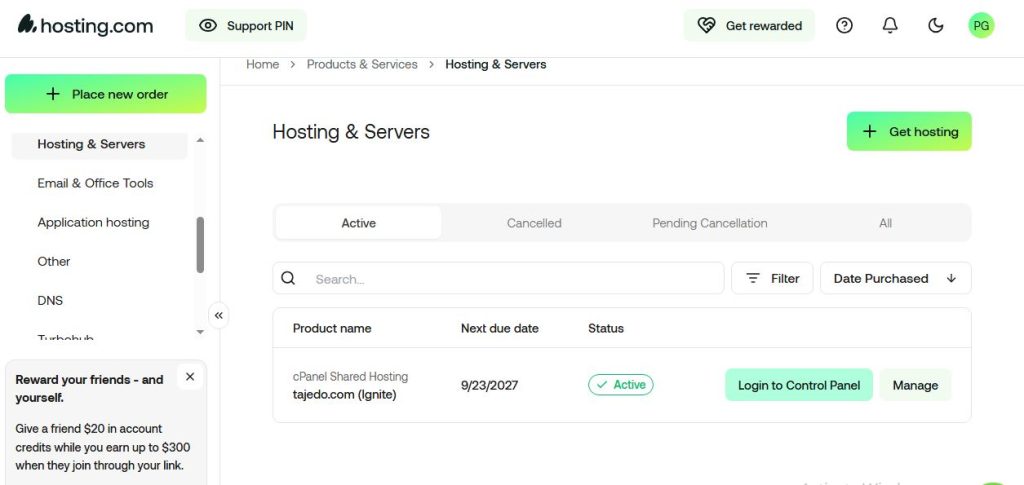
This isn’t my hosting.com review based solely on running a website through a testing tool for a few days.
I’ve been using Hosting.com for about three years now.
My website, Tajedo.com, runs on their shared hosting.
I originally signed up when the company was still called A2 Hosting. Later, the company changed its name to Hosting.com. I received an email explaining the change, and from my side, there wasn’t anything I needed to do.
My website continued running as normal.
I didn’t have to migrate my website.
I didn’t have to change my setup.
I didn’t have to start over with a new account.
That was probably the best kind of rebrand experience: nothing broke, and I didn’t have to do anything.
And over the years I’ve been using the service, I haven’t had problems with my website’s performance.
That’s important because a hosting company can look fantastic on a pricing page and still be frustrating to use in the real world.
My experience with Hosting.com has been quite different.
Note: With every hosting plan, hosting.com includes;
- A free domain name
- At least 5 free email accounts
- A free SSL certificate
- LiteSpeed servers
- cPanel
- Unlimited MariaDB databases and FTP accounts
As you upgrade, you get more access to more resources and features.
Performance & Speed
Performance is one of the biggest reasons I have continued using Hosting.com.
I’ve had my website hosted with them for around three years, and I haven’t experienced performance problems that have made me want to move to another host.
That doesn’t mean every website on Hosting.com will perform exactly the same way.
Your website speed can depend on your theme, plugins, images, database, caching, traffic, location, and the resources available on your particular plan.
But from my own experience, I haven’t had a reason to complain about the performance of my shared hosting account.
Hosting.com also uses performance-focused technology such as LiteSpeed caching, NVMe storage, and tuned database infrastructure on its hosting platform.
For a small website, blog, or business site, that’s more than enough to give you a good starting point.
And if your website grows, you don’t necessarily have to leave the platform. Hosting.com offers higher-level plans and server options for websites that need more resources.
My Experience With Performance
This is where I think real-world experience matters.
I’ve had Tajedo.com running on Hosting.com’s shared hosting for about three years.
During that time, I haven’t had ongoing performance issues that pushed me to look for another host.
My site loads properly, visitors can access it normally, and I haven’t had the kind of recurring slowdowns that would make me question the hosting provider.
So while I haven’t run a laboratory-style benchmark every month for three years, I can tell you something more useful from my perspective:
I’ve been using the service for 3 years, and it has worked well for my website.
Uptime & Reliability
I don’t want to pretend I’ve manually monitored every minute of uptime for three years.
I haven’t.
But I can tell you what I have experienced as an actual customer.
My website has been running on Hosting.com’s shared hosting, and I haven’t had ongoing downtime or reliability problems that have affected my ability to run Tajedo.com.
That’s important to me.
Hosting.com also advertises a 99.9% uptime SLA, which gives customers a formal reliability commitment.
But I’d still separate that promise from personal experience.
An uptime guarantee is useful, but what matters to a website owner is whether the website is actually available when visitors need it.
In my case, I haven’t experienced recurring availability problems that would make me want to move.
Is Hosting.com Reliable?
Based on my three years of using the service, I’d say yes.
Could another customer have a different experience?
Absolutely.
Hosting performance can vary depending on the server, plan, website configuration, traffic, and other factors.
That’s why I wouldn’t tell you that Hosting.com can never have downtime.
Instead, I’ll tell you what I know:
I’ve been using it for around three years, and reliability hasn’t been a reason for me to leave.
Control Panel & cPanel Experience
One of the things I like about Hosting.com is that you can still get into the technical side of your hosting when you need to.
I use cPanel with my shared hosting account, and this gives me access to the tools I need to manage my website.
If you’re an experienced website owner or developer, that’s useful.
You can work with files, databases, PHP, email, domains, and other hosting settings without being locked into a super-simplified interface.
But what about beginners?
That’s where support becomes important.
You don’t have to know everything about cPanel before buying hosting.
If you don’t know how to install WordPress, configure something in your account, or troubleshoot a hosting issue, you can reach out to Hosting.com’s support team.
And that’s something I’ve personally done.
My PHP Script Experience
One of my better experiences with Hosting.com happened when I needed to install a PHP script through cPanel.
I ran into a problem during the installation.
Instead of spending hours trying to figure it out myself, I contacted support.
One of their support representatives helped me resolve the issue in less than 10 minutes.
That’s a big deal.
When you’re running a website, your time is valuable.
I’d rather spend ten minutes talking to someone who knows what they’re doing than spend three hours searching through forums trying to figure out why a PHP script isn’t installing properly.
WordPress Hosting
If you’re a beginner, this is one of the areas where I think Hosting.com can be particularly useful.
You don’t have to be a WordPress expert to get started.
Hosting.com supports WordPress on its hosting plans, and WordPress can be installed through the hosting environment.
But here’s something I think beginners should know:
If you don’t know how to install WordPress yourself, you can ask support for help.
You don’t necessarily have to figure everything out alone.
That’s one of the reasons I think customer support is such an important part of choosing a host.
You can watch ten YouTube tutorials and still get stuck.
Sometimes you just want to ask someone who works with hosting every day.
Is Hosting.com Good for Beginners?
I’d say yes, particularly if you’re the type of beginner who doesn’t mind asking for help.
You don’t need to know everything about cPanel, PHP, DNS, or WordPress before you start.
And if you get stuck, Hosting.com’s support team can help guide you through the problem.
Of course, you should still learn the basics as you go.
But you don’t need to become a server expert before launching your first website.
Security
Security is another area where I don’t want to overcomplicate things.
Your hosting provider should give you a strong security foundation, and Hosting.com includes several important security tools.
These include features such as:
- SSL certificates
- Malware detection and removal
- Web application firewall protection
- DDoS protection
- Automated backups
- Account security tools
Hosting.com also includes daily backups on its shared hosting plans, with backups stored off-server and available for restoration within the stated retention period.
For me, having these protections included is important because I don’t want to build every security layer from scratch.
That said, hosting security isn’t a replacement for basic website security.
You should still:
- Keep WordPress updated
- Update your plugins and themes
- Use strong passwords
- Enable two-factor authentication where available
- Keep your own backup of important website data
Think of hosting security as the locks on your front door.
You still shouldn’t leave the windows wide open.
Backups
Backups are one of those features you don’t think much about until you desperately need one.
Hosting.com includes daily backups with its shared hosting plans.
The company says these backups are stored off-server and can be restored to a point within the previous 30 days.
That’s a useful safety net.
If a WordPress update breaks something or you accidentally mess up an important file, having a recent backup can save you from starting over.
Still, I recommend keeping an additional backup outside your hosting account for any website that matters to you.
Hosting.com can provide the hosting backup layer.
Your own independent backup gives you another layer of protection.
Migrations
If you’re moving from another hosting company, Hosting.com can also help with migration.
The company currently advertises free managed migrations, including moving websites, emails, and domains.
That’s useful because website migrations can be stressful, especially if you’re not technically experienced.
A migration isn’t just copying a few files.
You may need to move:
- Website files
- Databases
- Email accounts
- Domains
- DNS settings
- SSL configuration
- WordPress installations
Having a hosting team help with that can save you a lot of time.
Hosting.com Pricing
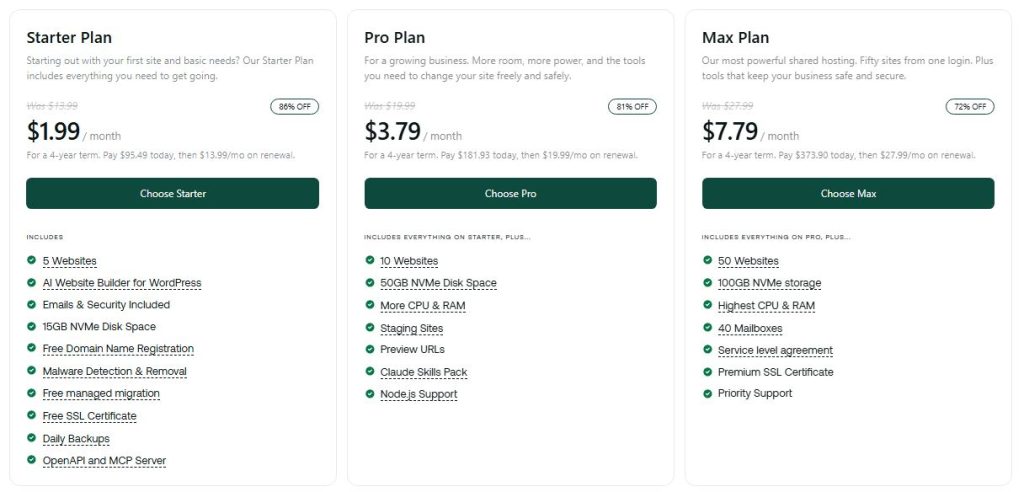
Hosting.com has several hosting options, but if you’re a beginner or running a small website, shared hosting is probably where you’ll start.
The current shared hosting lineup includes Starter, Pro, and Max.
The Starter plan is currently advertised from $1.99/month as a promotional price.
Here’s what the current shared hosting plans include:
| Feature | Starter Plan | Pro Plan | Max Plan |
|---|---|---|---|
| Promotional price | $1.99/mo | $3.79/mo | $7.79/mo |
| Websites | 5 | 10 | 50 |
| NVMe storage | 15GB | 50GB | 100GB |
| LiteSpeed caching | Yes | Yes | Yes |
| Free SSL | Yes | Yes | Yes |
| Malware detection & removal | Yes | Yes | Yes |
| Free managed migration | Yes | Yes | Yes |
| Daily backups | Yes | Yes | Yes |
| Yes | Yes | Yes | |
| Free domain registration | Yes | Yes | Yes |
| Staging sites | — | Yes | Yes |
| Preview URLs | — | Yes | Yes |
| Priority support | — | — | Yes |
The $1.99/month figure is the promotional Starter price available at the time of this review. Pricing, billing terms, and promotions can change.
My Shared Hosting Plan
I’ve been using Hosting.com’s shared hosting for my website, and that’s important context for this review.
I haven’t needed to move Tajedo.com to VPS or dedicated hosting.
The shared hosting plan has been enough for my website.
That’s one of the reasons I think shared hosting makes sense for beginners and small website owners.
You don’t necessarily need to spend more money just because VPS or dedicated hosting sounds more powerful.
Start with what you actually need.
Upgrade when your website requires it.
Hosting Up to 5 Websites
One of the biggest advantages of the Starter shared hosting plan is that you can host up to five websites.
For someone starting out, that’s a lot of room.
You could have:
- Your main business website
- A personal blog
- A portfolio
- A second project
- A small experimental site
And still keep them under the same hosting plan.
That can make shared hosting especially attractive if you’re managing several smaller websites.
Pro and Max
If five websites aren’t enough, Hosting.com’s higher shared hosting plans increase the limits.
Pro supports up to 10 websites with 50GB of NVMe storage and adds more CPU and RAM, along with features such as staging sites and preview URLs.
Max increases the limit to 50 websites and 100GB of NVMe storage. It also provides the highest CPU and RAM allocation in the shared hosting lineup, plus priority support and other extras.
For most beginners, I wouldn’t rush into Pro or Max.
Start with the plan that matches your current needs.
You can always upgrade later if your websites grow.
What About Renewal Pricing?
This is one area where I want to be careful.
You’ll often see hosting companies advertise an attractive introductory price, but the amount you pay after the promotional period can be different.
So before purchasing Hosting.com, check the current renewal price and billing terms on the checkout page.
I don’t want to tell you that Hosting.com’s renewal pricing is automatically “too high” without looking at the exact offer available when you purchase.
The better advice is simple:
Know both your introductory price and your renewal price before you click Buy.
That way, there are no surprises later.
Free Domain
Hosting.com’s shared hosting plans currently include free domain registration on eligible plans.
That’s useful if you’re starting a brand-new website because you can avoid paying separately for the domain during the initial period.
Just remember that domain registration and hosting are separate costs once the free registration period ends.
Customer Support
This is probably the strongest part of my personal experience with Hosting.com.
I’ve had to contact support, and the experience was good.
The best example is the PHP script issue I mentioned earlier.
I was trying to install a PHP script through cPanel and ran into a problem.
I contacted support.
A support representative helped me troubleshoot it and we had the issue resolved in less than 10 minutes.
That may not sound like a huge deal.
But when your website is stuck, ten minutes feels much better than spending an entire afternoon trying to figure things out yourself.
Hosting.com currently offers 24/7 support through live chat, phone, and tickets, with an in-house support team.
Support for Beginners
This is another reason I’d recommend Hosting.com to beginners.
Let’s say you’ve purchased your first hosting plan.
You’ve bought your domain.
You’ve logged into cPanel.
And now you’re staring at the screen wondering:
“Okay… how do I install WordPress?”
You don’t necessarily have to figure it out alone.
You can reach out to support and ask for help.
That’s something I value because good hosting isn’t just about server hardware.
It’s also about what happens when you get stuck.
Hosting.com Pros and Cons
After using Hosting.com for around three years, here’s how I’d sum up the biggest advantages and disadvantages.
Pros
Free domain for the first year on eligible plans
If you’re starting a new website, having domain registration included can reduce your initial costs.
Great introductory prices
The current Starter promotional price of $1.99/month makes the service attractive for new customers.
Excellent customer support experience
My own experience has been very positive. When I had trouble installing a PHP script through cPanel, a support representative helped me resolve the issue in less than 10 minutes.
Good performance
I’ve been running Tajedo.com on Hosting.com’s shared hosting for around three years without ongoing performance problems.
Host up to 5 websites on Starter
The Starter shared hosting plan supports up to five websites, which gives beginners and small website owners plenty of room to work with.
Strong security features
SSL, malware protection, firewall protection, backups, and other security features are included with the hosting plans.
Daily backups
Daily backups give you an additional safety net if something goes wrong with your website.
Free managed migrations
Hosting.com can handle website migrations for you, which can make switching hosts much less stressful.
Cons
Promotional pricing isn’t the whole story
The introductory price can be attractive, but you should always check the renewal price before purchasing.
cPanel can have a learning curve
Beginners may need some time to understand cPanel and the different hosting settings.
Higher plans may be unnecessary for beginners
If you’re running one small website, you probably don’t need to pay for a plan with resources designed for dozens of websites.
Some features depend on your plan
Storage, website limits, CPU, RAM, staging, support levels, and other features vary between plans.
Who Should Use Hosting.com?
Beginners
I’d recommend Hosting.com to beginners who want the ability to ask for help when they get stuck.
You don’t have to know how to install WordPress, configure every cPanel setting, or troubleshoot PHP before you start.
If you run into a problem, you can contact support.
That’s a big advantage when you’re launching your first website.
Bloggers
If you’re starting a blog, shared hosting should be more than enough for many new websites.
You don’t need a dedicated server just to publish blog posts.
Start small and upgrade when your traffic and resource requirements justify it.
Small Businesses
Hosting.com is also a good fit for small business websites.
You get hosting, email, SSL, security features, backups, and room to host multiple websites depending on the plan.
Developers
Developers may appreciate the ability to work with PHP, databases, cPanel, and other technical tools.
My own PHP script installation issue is a good example of why having both technical control and access to support is useful.
People Managing Multiple Websites
If you’re running several smaller websites, the ability to host up to five websites on the Starter plan makes the service particularly attractive.
If you eventually need more, the Pro and Max plans provide higher website limits.
Who Should Look Elsewhere?
People Who Want the Absolute Simplest Hosting Experience
If you want an interface where almost everything is handled automatically and you never want to touch a hosting control panel, a more beginner-focused managed service might suit you better.
People Focused Only on Long-Term Price
Don’t choose Hosting.com solely because of the $1.99 introductory offer.
Compare the renewal cost with competing hosts before making a long-term decision.
Large Websites With Heavy Resource Requirements
If you’re running a high-traffic ecommerce store, large application, or resource-heavy website, shared hosting may eventually become limiting.
That’s when you should look at VPS, cloud, or dedicated hosting.
Hosting.com vs. Alternatives
Hosting.com isn’t the only good option.
The right choice depends on your budget, technical experience, website size, and how much help you want.
| Host | Best For | What to Consider |
|---|---|---|
| Hosting.com | Flexible shared hosting and support | Check renewal pricing |
| Hostinger | Budget-conscious beginners | Compare resources and renewal cost |
| SiteGround | Managed WordPress | Compare long-term pricing |
| Bluehost | Beginner WordPress users | Compare features and renewal cost |
Hosting.com vs. Hostinger
Hostinger is worth considering if you’re mainly focused on keeping your hosting costs low.
Hosting.com has a strong advantage if you value customer support and the ability to manage multiple websites under one shared hosting account.
My own experience also gives Hosting.com an advantage for me because I already know the platform works well for my website.
Hosting.com vs. SiteGround
SiteGround is popular with WordPress users who want a more managed experience.
Hosting.com gives you more of a traditional hosting environment with cPanel and flexibility across different types of websites.
If you like having more control, I’d lean toward Hosting.com.
If you want a more managed WordPress experience, SiteGround is worth comparing.
Hosting.com vs. Bluehost
Bluehost is another popular choice for beginners.
The main thing I’d compare is the overall experience after signup.
Look at the dashboard, support, included resources, WordPress setup, and long-term price.
For me, Hosting.com’s support experience and my three years of using the service make it an easy choice for my own websites.
Read our Roundup post on (Best web hosting services for affiliate marketing)
Should Existing A2 Hosting Customers Switch?
If you were already using A2 Hosting, I wouldn’t switch simply because the company changed its name.
I was using A2 Hosting myself when the rebrand happened.
I received an email explaining the change, and I didn’t have to do anything.
My website continued operating normally.
So if you’re an existing A2 customer and your website is working well, there’s no reason to panic.
Look at the things that actually matter:
Is your website performing well?
Are you happy with support?
Does your current plan meet your needs?
Are you comfortable with the current pricing?
If the answers are yes, I’d keep using the service.
If you’re unhappy with the performance, support, or price, then compare alternatives.
But don’t move simply because the company now says Hosting.com instead of A2 Hosting.
Customer Support & User Feedback
Support is one of the biggest reasons I have stayed with Hosting.com.
My own experience has been positive.
The PHP script issue I had is the best example.
I contacted support because I couldn’t get the script installed correctly through cPanel.
A support representative worked through the problem with me and had it resolved in less than ten minutes.
That’s exactly what I want from a hosting company.
I don’t expect never to have a technical problem.
I expect that when one happens, someone can help me solve it.
Hosting.com currently provides 24/7 support through live chat, phone, and tickets, with an in-house support team.
The company also provides an AI assistant called Orbi for instant help with common technical and account questions.
But even with all those support options, my recommendation is based mostly on what I’ve personally experienced.
And so far, that experience has been good.
Frequently Asked Questions
Is Hosting.com a good web host?
Yes. Based on my experience using the service for around three years, I consider Hosting.com a good web host.
I’ve had no ongoing performance problems with Tajedo.com, and I’ve had a very positive experience with customer support.
How long have you used Hosting.com?
I’ve used the service for around three years.
I originally used it when it was called A2 Hosting and continued using the service after the company rebranded as Hosting.com.
Is Hosting.com the same as A2 Hosting?
Hosting.com is the brand A2 Hosting transitioned to.
I was already a customer when the name changed. Hosting.com notified customers by email, and I didn’t have to migrate my website or make changes on my side.
Is Hosting.com good for beginners?
Yes.
I’d especially recommend it to beginners who want access to real customer support when they get stuck.
If you don’t know how to install WordPress or you’re having trouble with your hosting account, you can contact support for help.
Can Hosting.com help me install WordPress?
If you’re having trouble installing WordPress, you can contact Hosting.com’s support team for assistance.
This is one of the reasons I think the service is beginner-friendly.
You don’t need to know everything about hosting before you get started.
How many websites can I host on Hosting.com?
The current Starter shared hosting plan supports up to five websites.
The Pro plan supports up to 10 websites, while Max supports up to 50.
Does Hosting.com include backups?
Yes. Hosting.com’s shared hosting plans include daily backups.
The company says these backups are stored off-server and can be restored to a point within the previous 30 days.
Does Hosting.com offer free migration?
Yes. Hosting.com currently advertises free managed migrations.
That can be especially helpful if you’re moving an existing website from another hosting company.
Does Hosting.com offer a free domain?
Eligible shared hosting plans include free domain registration.
Check the current plan terms to confirm eligibility for the domain extension you want.
How much does Hosting.com cost?
The current promotional Starter price is $1.99/month.
However, promotional prices can change, so check the live pricing page before purchasing.
You should also check the renewal price and billing term so you know the long-term cost.
Does Hosting.com have a money-back guarantee?
Yes. Hosting.com offers a 30-day money-back guarantee, subject to its terms.
Is Hosting.com fast?
In my experience, yes.
I’ve been using Hosting.com’s shared hosting for around three years with Tajedo.com, and I haven’t experienced ongoing performance problems that have made me consider moving to another host.
Is Hosting.com reliable?
My experience has been positive.
I’ve been using the service for around three years and haven’t had recurring reliability problems with my website.
Hosting.com also advertises a 99.9% uptime SLA.
Is Hosting.com good for PHP scripts?
Yes.
Hosting.com supports PHP and provides cPanel tools for managing your hosting environment.
I personally installed a PHP script on my hosting account and had an issue during setup. Support helped me resolve it in less than ten minutes.
Should I switch from Hosting.com to another host?
If your website is performing well, you like the support, and you’re happy with the price, I don’t see a reason to switch simply for the sake of switching.
I’ve been using the service for around three years and continue to use it for Tajedo.com.
Final Verdict: Is Hosting.com Worth It?
After around three years of using Hosting.com for my own website, I can give you a very different answer than someone who has only tested the service for a few days.
Yes, I think Hosting.com is worth considering.
My website, Tajedo.com, has been running on their shared hosting without performance problems that have made me want to leave.
I’ve also had a genuinely good experience with their support.
When I had trouble installing a PHP script through cPanel, a support representative helped me fix the problem in less than ten minutes.
That’s the kind of thing you remember.
And if you’re a beginner, I think that support is one of Hosting.com’s biggest advantages.
You don’t have to know everything about hosting before you start. If you get stuck installing WordPress or configuring something in cPanel, you have somewhere to turn.
The shared Starter plan also gives you room for up to five websites, which is more than enough for many beginners, bloggers, and small businesses.
The current promotional price of $1.99/month makes the entry point attractive too.
Just don’t make your decision based on the promotional price alone.
Check the renewal price and current plan terms before purchasing.
For me, though, the biggest selling point isn’t the $1.99 price.
It’s the fact that I’ve been using the service for around three years and haven’t had a reason to leave.
My Final Rating: 4.8/5
Hosting.com is a solid choice for beginners, bloggers, developers, and small businesses that want reliable shared hosting, helpful support, and enough flexibility to grow.
Ready to try Hosting.com?
Get Hosting.com from $1.99/month →
Pricing, promotions, plan features, and renewal terms can change. Check Hosting.com’s current pricing before purchasing.